Invoice data extraction: how to extract data from invoices reliably
Extract invoice number, dates, line items and totals from invoices with OCR and Python, then catch errors with arithmetic checks. Tested on 8 OCR models.
Updated
TL;DR
- Use OCR that keeps the line-item table: 5 of the 8 models we tried did, 3 flattened it to text.
- Regex extraction worked on all 8 outputs only after we handled bold labels and merged lines.
- Check the arithmetic: qty x price, the sum of lines, and subtotal + tax = total.
- Prebuilt invoice APIs from Azure, AWS and Google are a fast start if their fields match yours.
Invoice data extraction means turning an invoice (a PDF, a scan or a phone photo) into structured fields: invoice number, seller, dates, line items, subtotal, tax and total. The reliable way to do it is a pipeline of three steps: OCR that keeps the line-item table, field extraction, and arithmetic checks that catch mistakes before the data reaches your accounting system. This guide walks through each step with Python code we ran on November 15, 2026, and shows where it broke.
The three ways to extract data from an invoice
| Approach | How it works | Good for | Weak spot |
|---|---|---|---|
| Templates and rules | Fixed positions or regex per supplier | A few suppliers with stable layouts | Every new layout needs a new template |
| Prebuilt invoice APIs | A cloud model trained on invoices returns named fields | Common invoice formats, quick start | Fixed field list, per-page cost, vendor lock-in |
| OCR + your own extraction | OCR to Markdown or JSON, then regex or an LLM maps text to your schema | Your own fields, mixed sources, switching models | You own the parsing code and its tests |
The big cloud vendors each sell a prebuilt invoice model: Azure Document Intelligence prebuilt invoice, Amazon Textract AnalyzeExpense and Google's Invoice Parser in Document AI. If their field list matches yours, start there.
The rest of this post covers the third approach, because it is the one you control end to end and the one where the choice of OCR model matters most.
Step 1: OCR that keeps the table
Line items are a table. If your OCR flattens the table into text, you have to guess which number belongs to which column. That guess is where most invoice bugs come from.
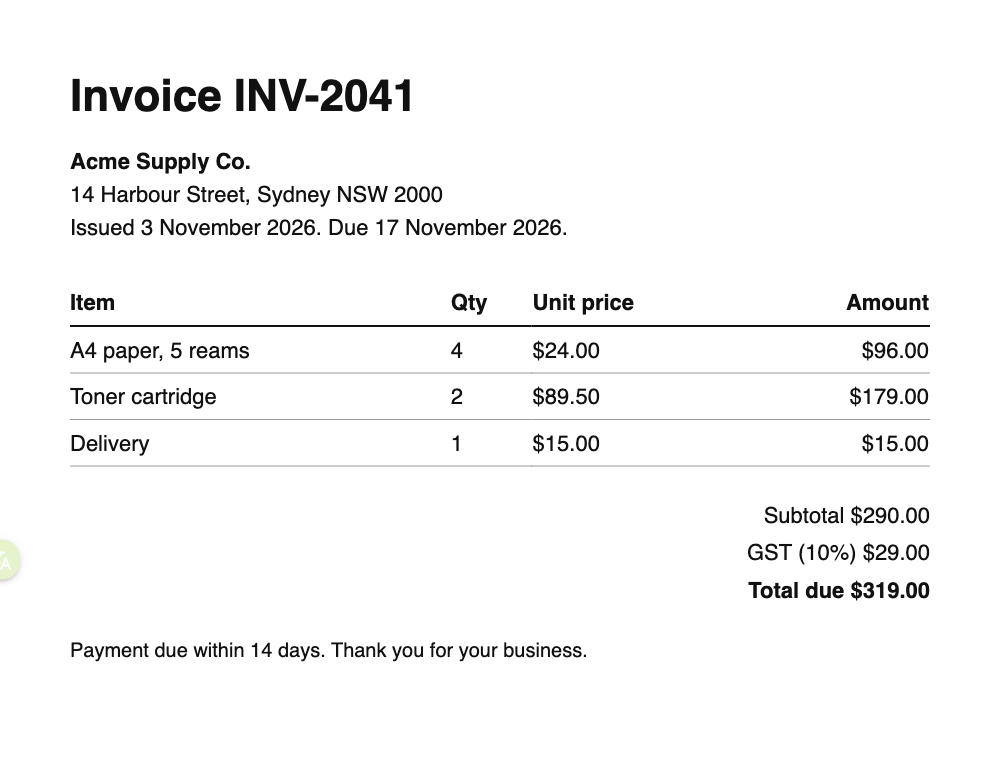
We sent our sample invoice (three line items, a subtotal, 10% GST and a total) to eight models through the OCRRouter API and looked at what came back for the line items:
| Model | Line items | Credits per page |
|---|---|---|
| mistral/mistral-ocr | Markdown table | 6 |
| zai/glm-ocr | Markdown table | 2 |
| paddle/paddleocr-vl | Markdown table | 2 |
| jina/jina-ocr | Markdown table | 1 |
| azure/document-intelligence | Markdown table (plus the cells again as separate lines) | 15 |
| google/document-ai | Plain text | 3 |
| aws/textract | Plain text | 6 |
| tesseract/tesseract | Plain text | Free |
1,000 credits cost $1, so 2 credits is $0.002 a page. Prices change; the model pages are always current. On this clean invoice the text itself was right almost everywhere: seven models got every word, and zai/glm-ocr dropped one space (A4 paper,5 reams). The real difference was structure: five kept the table, three did not.
Step 2: pull out the fields
Here is the full script. It sends the invoice for OCR, finds the header fields with regular expressions, reads line items from the first Markdown table, and runs the checks from step 3.
import base64, json, os, re, sys
from decimal import Decimal
import requests

API = os.environ.get("OCRROUTER_API", "https://api.ocrrouter.ai")

def ocr(path: str, model: str) -> str:
    with open(path, "rb") as f:
        b64 = base64.b64encode(f.read()).decode()
    r = requests.post(
        f"{API}/v1/ocr",
        headers={"Authorization": f"Bearer {os.environ['OCRROUTER_API_KEY']}"},
        json={"model": model, "file_base64": b64, "format": "markdown"},
        timeout=120,
    )
    r.raise_for_status()
    return r.json()["markdown"]

def money(s: str) -> Decimal:
    return Decimal(re.sub(r"[^\d.]", "", s))

def find(pattern: str, text: str):
    m = re.search(pattern, text, re.I)
    return m.group(1).strip() if m else None

def line_items(md: str) -> list[dict]:
    """Rows of the first Markdown table whose header has Qty and Amount."""
    rows = [l for l in md.splitlines() if l.strip().startswith("|")]
    if not rows:
        return []
    cells = [[c.strip() for c in r.strip().strip("|").split("|")] for r in rows]
    header, body = [h.lower() for h in cells[0]], cells[2:]  # cells[1] is the |---| line
    return [dict(zip(header, r)) for r in body]

def extract(md: str) -> dict:
    md = re.sub(r"\*\*|__", "", md)  # some models bold labels: **Subtotal** $290.00
    return {
        "invoice_number": find(r"Invoice\s+([A-Z]+-\d+)", md),
        "seller": find(r"Invoice\s+[A-Z]+-\d+\s*\n+\s*([^\n|]+)", md),
        "issue_date": find(r"Issued\s+([^.]+)\.", md),
        "due_date": find(r"Due\s+(\d[^.]+)\.", md),
        "subtotal": find(r"Subtotal\s+(\$[\d,.]+)", md),
        "tax": find(r"GST \(10%\)\s+(\$[\d,.]+)", md),
        "total": find(r"Total due\s+(\$[\d,.]+)", md),
        "line_items": line_items(md),
    }

def check(inv: dict) -> list[str]:
    """Arithmetic checks. An empty list means the numbers add up."""
    problems = []
    items = inv["line_items"]
    for it in items:
        if money(it["unit price"]) * int(it["qty"]) != money(it["amount"]):
            problems.append(f"line {it['item']!r}: qty x price != amount")
    if items and sum(money(it["amount"]) for it in items) != money(inv["subtotal"]):
        problems.append("line items do not add up to the subtotal")
    if money(inv["subtotal"]) + money(inv["tax"]) != money(inv["total"]):
        problems.append("subtotal + tax != total")
    return problems

if __name__ == "__main__":
    model = sys.argv[1] if len(sys.argv) > 1 else "mistral/mistral-ocr"
    inv = extract(ocr("invoice.png", model))
    print(json.dumps(inv, indent=2))
    print("checks:", check(inv) or "all passed")
Run it with OCRROUTER_API_KEY set. Output with the default model:
{
  "invoice_number": "INV-2041",
  "seller": "Acme Supply Co.",
  "issue_date": "3 November 2026",
  "due_date": "17 November 2026",
  "subtotal": "$290.00",
  "tax": "$29.00",
  "total": "$319.00",
  "line_items": [
    {"item": "A4 paper, 5 reams", "qty": "4", "unit price": "$24.00", "amount": "$96.00"},
    {"item": "Toner cartridge", "qty": "2", "unit price": "$89.50", "amount": "$179.00"},
    {"item": "Delivery", "qty": "1", "unit price": "$15.00", "amount": "$15.00"}
  ]
}
checks: all passed
(We put each line item on one line here to save space.)
What broke when we switched models
We ran the same script against all eight models. It is worth reading, because it is what will happen to your parser in production:
- Bold labels.
jina/jina-ocrwrote**Subtotal** $290.00. Our first version of the regex missed it and the script crashed onNone. The fix is there.subline that strips**before matching. - Merged lines.
azure/document-intelligenceandaws/textractput the seller, address and dates on one line, sosellercame back as the whole block:Acme Supply Co. 14 Harbour Street, Sydney NSW 2000 Issued 3 November.... - No table, no line items. With
google/document-ai,aws/textractandtesseract/tesseract,line_itemswas an empty list. The header totals were still found, so the checks passed, which is exactly why you also need a check that line items exist.
The lesson: regex extraction is tied to one model's formatting. Pin the model, keep a set of real invoices as test files, and rerun them when you change anything.
Step 3: check the arithmetic
OCR errors on invoices are often single characters: an 8 read as 3, a missing decimal point. Arithmetic catches many of them for free, because invoices have redundancy built in:
- each line: quantity x unit price = amount
- sum of line amounts = subtotal
- subtotal + tax = total
The check() function above does all three with Python's Decimal, not floats, so 0.1 + 0.2 problems cannot create false alarms. Add your own rules too: a due date after the issue date, a known tax rate for the country, a supplier tax ID that matches your vendor list.
When a check fails, do not guess. Send the invoice to a second model (the OCRRouter API takes a fallbacks list of model IDs) or to a person.
Using an LLM for the extraction step
Regex is fine when you control the layouts. For invoices from hundreds of suppliers, a common pattern is to give the OCR Markdown to a language model with a JSON schema of the fields you want. This handles labels like "Amount due", "Balance" and "Total payable" without a rule for each. Two cautions:
- Keep the OCR step separate. If the LLM reads the image directly, you cannot tell whether a wrong number came from reading or from reasoning.
- Keep the arithmetic checks. LLMs can produce totals that look right and are not.
We are working on a named-field endpoint for exactly this, so you can pass your schema to the same API. Until then, the invoice OCR page lists the models we would try first.
Checklist before you go live
- Collect 30 or more real invoices from your actual suppliers, including the worst phone photos.
- Write down the correct fields for each by hand. This is your test set.
- Pick an OCR model that returns line items as a table on those files.
- Measure field accuracy, not just character accuracy. A total with one wrong digit is a wrong total.
- Route every invoice that fails a check to review.
- Re-run the test set whenever you change the model or the parser.
Try it without code
Upload an invoice to the playground and switch models to see which ones keep your line items as a table. If you only need the text, the free PDF to Excel tool gives you a spreadsheet. For bank statements, receipts and other documents, see OCR by document type.